Set the decision
Check how readers interpret a reporting day's boundary when timestamps are displayed in a different time zone.
Product and software research · A focused questionnaire
Check how readers interpret a reporting day's boundary when timestamps are displayed in a different time zone.
Opens product registration. Example questions are not imported automatically.
FOLLOW THE FEEDBACK
In a synthetic report, which records move into a different day when the display time zone changes?
Which time zone should define the reporting period, and where was that rule explained?
How should records exactly at midnight be described in the boundary explanation?
A planning aid, not automated analysis of your answers.
From question to next step
Check how readers interpret a reporting day's boundary when timestamps are displayed in a different time zone.
Show a synthetic report with its documented governing time zone, a different display zone, and fabricated timestamps on both sides of midnight. Ask readers to explain the boundary before using real reporting data.
State the report's governing time zone separately from the display zone and show fabricated records on both sides of its midnight boundary.
A worked interpretation example
Illustrative scenario. These are not customer results.
In a synthetic report, a record at 23:30 UTC appears on the following calendar day at a fixed UTC+02:00 display offset, so readers disagree about its reporting day.
State the report's governing time zone separately from the display zone and show fabricated records on both sides of its midnight boundary.
With the revised explanation, ask readers to assign the same fabricated timestamps to reporting days and explain their chosen zone. Check understanding against the documented rule rather than treating agreement as backend validation.
A useful starting point
The displayed date can change when a viewer changes time zone, even if the report’s governing period stays the same. Use fabricated records to test whether readers distinguish those rules and understand the midnight boundary. Confirm the actual rule in reporting documentation separately.
If nothing was unclear or difficult, say so. Skip questions about steps you did not experience; use not applicable where appropriate.
Ask readers to identify the affected fabricated records rather than rate the date filter. This separates a change in the displayed calendar day from a change in which timestamps belong to the period.
Surface the assumed reporting zone and the place readers expected to find it. The report owner can clarify an undocumented convention without claiming the survey establishes backend behavior.
Collect the wording needed for timestamps at the day boundary, then compare it with the documented rule. An explicit midnight example helps expose ambiguity that ordinary daytime records hide.
If nothing was unclear or difficult, say so. Skip questions about steps you did not experience; use not applicable where appropriate.

In a synthetic report, which records move into a different day when the display time zone changes?
Which time zone should define the reporting period, and where was that rule explained?
How should records exactly at midnight be described in the boundary explanation?
Download the questions as text ↓
Examples to adapt, rather than a validated research instrument.
Choose the response format
| Question | Suggested format | What to preserve |
|---|---|---|
| In a synthetic report, which records move into a different day when the display time zone changes? | Optional written explanation; none or not applicable accepted | Ask readers to identify the affected fabricated records rather than rate the date filter. This separates a change in the displayed calendar day from a change in which timestamps belong to the period. |
| Which time zone should define the reporting period, and where was that rule explained? | Optional written explanation; none or not applicable accepted | Surface the assumed reporting zone and the place readers expected to find it. The report owner can clarify an undocumented convention without claiming the survey establishes backend behavior. |
| How should records exactly at midnight be described in the boundary explanation? | Optional written explanation; none or not applicable accepted | Collect the wording needed for timestamps at the day boundary, then compare it with the documented rule. An explicit midnight example helps expose ambiguity that ordinary daytime records hide. |
Make questions optional where appropriate. If you add a rating scale, label its endpoints, keep one idea per question, and retain a follow-up for reasons. These examples are not a validated measurement instrument.
Read the answers carefully
Use fabricated timestamps only. Feedback about displayed dates does not establish the backend's filtering rule, and the reporting zone may differ from the viewer's zone.
In a synthetic report, a record at 23:30 UTC appears on the following calendar day at a fixed UTC+02:00 display offset, so readers disagree about its reporting day. Use fabricated timestamps only. Feedback about displayed dates does not establish the backend's filtering rule, and the reporting zone may differ from the viewer's zone.
Before you send it
Were the dates correct?
Which time zone should define the reporting period, and where was that rule explained?
The question isolates the governing reporting zone; the separate date-filtering guide addresses ordinary range inclusion and end-date interpretation.
Before you send it
Report readers and reporting owners comparing fabricated timestamps across reporting and display time zones. Include only the steps each person encountered; voluntary responses do not establish a representative sample.
Show a synthetic report with its documented governing time zone, a different display zone, and fabricated timestamps on both sides of midnight. Ask readers to explain the boundary before using real reporting data.
Ask readers to identify the affected fabricated records rather than rate the date filter. This separates a change in the displayed calendar day from a change in which timestamps belong to the period.
Surface the assumed reporting zone and the place readers expected to find it. The report owner can clarify an undocumented convention without claiming the survey establishes backend behavior.
Collect the wording needed for timestamps at the day boundary, then compare it with the documented rule. An explicit midnight example helps expose ambiguity that ordinary daytime records hide.
State the report's governing time zone separately from the display zone and show fabricated records on both sides of its midnight boundary. With the revised explanation, ask readers to assign the same fabricated timestamps to reporting days and explain their chosen zone. Check understanding against the documented rule rather than treating agreement as backend validation.
Copy the prompts or download TXT, CSV, JSON, or a Markdown worksheet, then adapt them in your own survey. The CTA opens registration; it does not import this example automatically. Verify available features in your account.
Inside the product
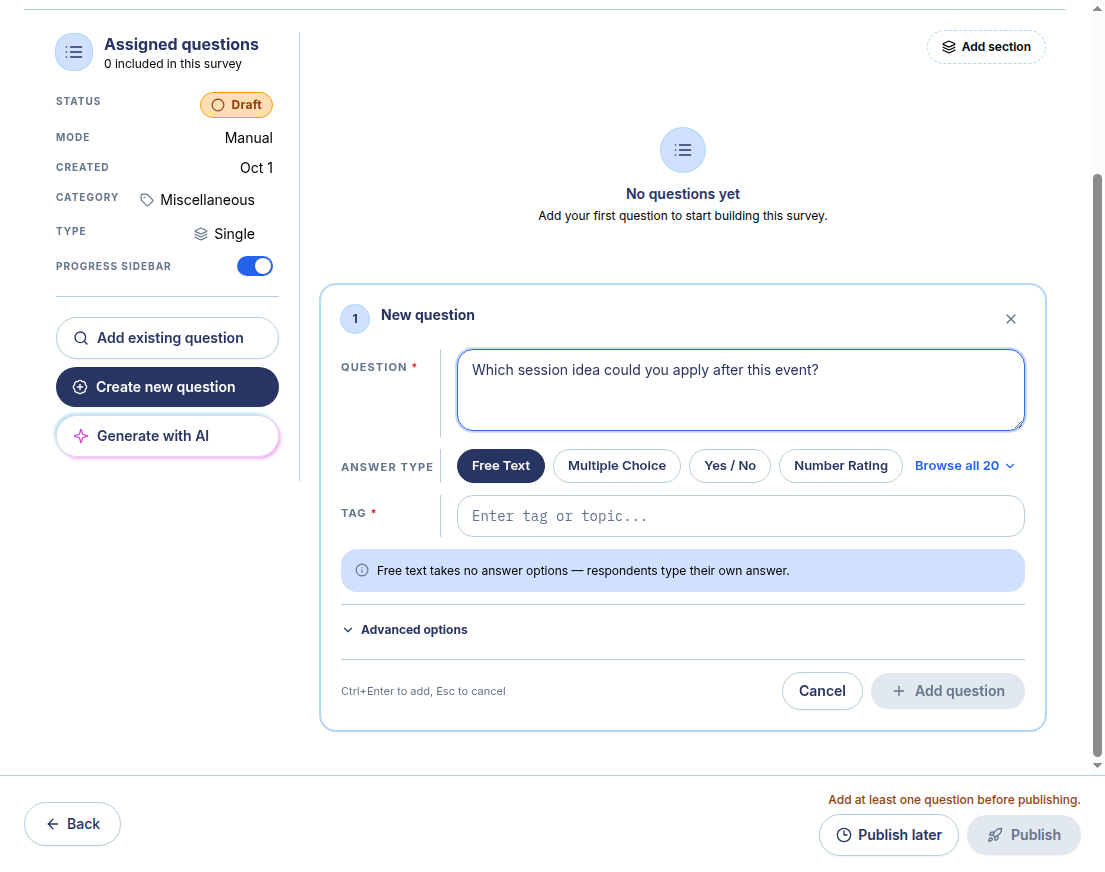
The real SurveyTeams screenshot shows a separate labelled synthetic event survey. It demonstrates the manual builder, not this questionnaire already loaded and not the task described in the software being evaluated.
Creation and preview were exercised in the observed account. Distribution, results and other features are separate workflows and depend on account conditions.
Build with SurveyTeams
Use these examples to draft your questionnaire. Create a survey draft, add questions, and check the respondent preview in SurveyTeams. Additional features depend on your account and plan.
Opens product registration. Example questions are not imported automatically.
Learn about the product ↗Continue exploring