Which administrative update was useful?
Read for useful update. Keep the specific explanation in the respondent’s own words rather than converting it into an unexplained overall satisfaction score.
Care-service experience · A focused questionnaire
Understand administrative family-update expectations.
Opens product registration. Example questions are not imported automatically.
CHOOSE YOUR STARTING QUESTIONS
Keep only prompts your respondents can answer. All questions remain available below.
3 questions selected. Nothing is submitted.
A useful starting point
Understand administrative family-update expectations. These prompts examine useful update, timing expectations, contact usability. Choose only questions your audience can answer. A missing detail can be answered with none; do not assume an issue occurred.
If nothing was unclear or difficult, say so. Skip questions about steps you did not experience; use not applicable where appropriate.
Read for useful update. Keep the specific explanation in the respondent’s own words rather than converting it into an unexplained overall satisfaction score.
Read for timing expectations. Keep the specific explanation in the respondent’s own words rather than converting it into an unexplained overall satisfaction score.
Read for contact usability. Keep the specific explanation in the respondent’s own words rather than converting it into an unexplained overall satisfaction score.
If nothing was unclear or difficult, say so. Skip questions about steps you did not experience; use not applicable where appropriate.

Which administrative update was useful?
What communication timing was unclear?
What general contact route worked?
Download the questions as text ↓
Examples to adapt, rather than a validated research instrument.
A worked interpretation example
Illustrative scenario. These are not customer results.
Families do not know administrative contact windows.
Explain routine administrative contact arrangements.
After testing this change—Explain routine administrative contact arrangements.—ask people who encountered the changed arrangement whether this original issue still occurred or did not occur: “Families do not know administrative contact windows.” Invite a concrete explanation, including none or not applicable. Compare participant context and sample differences; a before-and-after survey alone does not establish causation.
Choose the response format
| Question | Suggested format | What to preserve |
|---|---|---|
| Which administrative update was useful? | Optional free text; none or not applicable accepted | Read for useful update. Keep the specific explanation in the respondent’s own words rather than converting it into an unexplained overall satisfaction score. |
| What communication timing was unclear? | Optional free text; none or not applicable accepted | Read for timing expectations. Keep the specific explanation in the respondent’s own words rather than converting it into an unexplained overall satisfaction score. |
| What general contact route worked? | Optional free text; none or not applicable accepted | Read for contact usability. Keep the specific explanation in the respondent’s own words rather than converting it into an unexplained overall satisfaction score. |
Make questions optional where appropriate. If you add a rating scale, label its endpoints, keep one idea per question, and retain a follow-up for reasons. These examples are not a validated measurement instrument.
Before you send it
Would you agree that this entire experience was clear and easy?
Which administrative update was useful?
The first wording assumes a positive outcome and combines clarity with ease. The revised prompt asks about the concrete situation; respondents may report no difficulty.
From question to next step
Understand administrative family-update expectations.
Ask after an adult respondent has encountered this specific situation. For draft-copy testing, show the actual material first; accept none or not applicable when the issue did not occur.
Explain routine administrative contact arrangements.
Read the answers carefully
Do not collect resident health information.
Families do not know administrative contact windows. This is an illustrative pattern, not observed customer data. Do not collect resident health information.
Before you send it
Adult service users or administrative staff giving nonclinical feedback; no patient, resident or health details. Ask only about the step each person actually encountered; voluntary responses are not automatically representative.
Read for useful update. Keep the specific explanation in the respondent’s own words rather than converting it into an unexplained overall satisfaction score. It supports this decision: Understand administrative family-update expectations.
Read for timing expectations. Keep the specific explanation in the respondent’s own words rather than converting it into an unexplained overall satisfaction score.
Read for contact usability. Keep the specific explanation in the respondent’s own words rather than converting it into an unexplained overall satisfaction score. Do not collect resident health information.
Explain routine administrative contact arrangements. After testing this change—Explain routine administrative contact arrangements.—ask people who encountered the changed arrangement whether this original issue still occurred or did not occur: “Families do not know administrative contact windows.” Invite a concrete explanation, including none or not applicable. Compare participant context and sample differences; a before-and-after survey alone does not establish causation.
The page offers text, CSV, JSON and Markdown downloads plus manual copying. Registration does not import the questionnaire. Use account-supported features and verify your own response-handling arrangements.
Inside the product
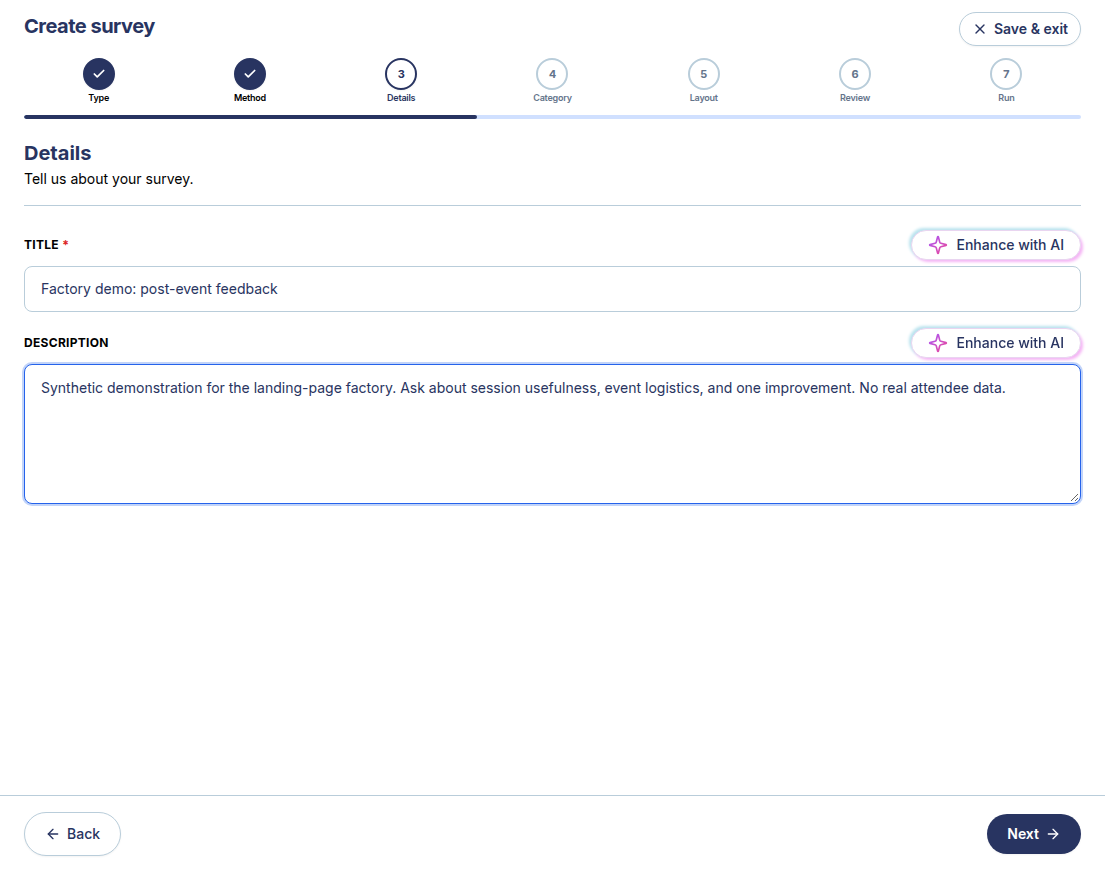
The real SurveyTeams screenshot shows a separate labelled synthetic event survey. It demonstrates the manual builder, not this questionnaire already loaded and not the task described in the software being evaluated.
Creation and preview were exercised in the observed account. Distribution, results and other features are separate workflows and depend on account conditions.
Build with SurveyTeams
Use these examples to draft your questionnaire. Create a survey draft, add questions, and check the respondent preview in SurveyTeams. Additional features depend on your account and plan.
Opens product registration. Example questions are not imported automatically.
Learn about the product ↗Continue exploring