Which account access or approval did you need before you could start setup?
Optional written explanation; none or not applicable acceptedIdentify the permission or approval category needed before setup. Ask for the step, not credentials or identifying account details; this helps the service owner document prerequisites.Customer experience / Survey guide
Customer experience · Practical field guide
New customer setup readiness survey
Check whether account prerequisites, the setup owner and the support route are clear before a new customer's first use.
Opens product registration. Example questions are not imported automatically.
DESIGN THE ANSWER SPACE
Which prerequisite was still missing when the welcome instructions arrived?
Optional written explanation; none or not applicable acceptedSeparate a missing prerequisite from difficulty using the product. This shows whether welcome instructions arrived before the customer could follow them, rather than whether a first task succeeded.Who did you understand was responsible for completing that prerequisite?
Optional written explanation; none or not applicable acceptedCheck whether the customer can identify the responsible role. Different assumptions about customer-admin and provider responsibilities point to a coordination gap that another tutorial will not resolve.Suggested formats to adapt, not preconfigured product fields.
A useful starting point
Check prerequisites and help routes before first use.
A new customer may receive welcome instructions before required access, approvals or administrator steps are ready. This questionnaire checks preparation and responsibility before first use. Keep it separate from product activation, which asks whether the customer reached a first useful result after basic setup.
If nothing was unclear or difficult, say so. Skip questions about steps you did not experience; use not applicable where appropriate.
Which account access or approval did you need before you could start setup?
Identify the permission or approval category needed before setup. Ask for the step, not credentials or identifying account details; this helps the service owner document prerequisites.
Which prerequisite was still missing when the welcome instructions arrived?
Separate a missing prerequisite from difficulty using the product. This shows whether welcome instructions arrived before the customer could follow them, rather than whether a first task succeeded.
Who did you understand was responsible for completing that prerequisite?
Check whether the customer can identify the responsible role. Different assumptions about customer-admin and provider responsibilities point to a coordination gap that another tutorial will not resolve.
Where could you ask for setup help if you could not yet sign in?
Test whether a person without working access can find a usable assistance route. An in-product help link cannot support a customer who is still unable to sign in.
Which prerequisite should the welcome checklist explain earlier?
Find the prerequisite whose earlier explanation would change preparation. Use that answer to revise the welcome checklist without removing required authorization, identity or security checks.
If nothing was unclear or difficult, say so. Skip questions about steps you did not experience; use not applicable where appropriate.

Which account access or approval did you need before you could start setup?
Which prerequisite was still missing when the welcome instructions arrived?
Who did you understand was responsible for completing that prerequisite?
Where could you ask for setup help if you could not yet sign in?
Which prerequisite should the welcome checklist explain earlier?
Download the questions as text ↓
Examples to adapt, rather than a validated research instrument.
Before you send it
Check what your wording assumes.
Did onboarding help you get value quickly?
Which prerequisite was still missing when the welcome instructions arrived?
The revised question identifies a preparation gap before first use, instead of repeating the product-activation guide's first useful outcome.
Choose the response format
Make room for the explanation.
| Question | Suggested format | What to preserve |
|---|---|---|
| Which account access or approval did you need before you could start setup? | Optional written explanation; none or not applicable accepted | Identify the permission or approval category needed before setup. Ask for the step, not credentials or identifying account details; this helps the service owner document prerequisites. |
| Which prerequisite was still missing when the welcome instructions arrived? | Optional written explanation; none or not applicable accepted | Separate a missing prerequisite from difficulty using the product. This shows whether welcome instructions arrived before the customer could follow them, rather than whether a first task succeeded. |
| Who did you understand was responsible for completing that prerequisite? | Optional written explanation; none or not applicable accepted | Check whether the customer can identify the responsible role. Different assumptions about customer-admin and provider responsibilities point to a coordination gap that another tutorial will not resolve. |
| Where could you ask for setup help if you could not yet sign in? | Optional written explanation; none or not applicable accepted | Test whether a person without working access can find a usable assistance route. An in-product help link cannot support a customer who is still unable to sign in. |
| Which prerequisite should the welcome checklist explain earlier? | Optional written explanation; none or not applicable accepted | Find the prerequisite whose earlier explanation would change preparation. Use that answer to revise the welcome checklist without removing required authorization, identity or security checks. |
Make questions optional where appropriate. If you add a rating scale, label its endpoints, keep one idea per question, and retain a follow-up for reasons. These examples are not a validated measurement instrument.
From question to next step
Make the feedback useful.
Set the decision
Check whether account prerequisites, the setup owner and the support route are clear before a new customer's first use.
Invite relevant voices
Ask after welcome instructions arrive and before the customer begins the first product task. Include people still waiting for required access; explain a help route that does not depend on signing in.
Choose an action
Add the approval prerequisite and responsible role to the welcome checklist, and provide a verified help route that works before account access is ready.
A worked interpretation example
From a comment to a practical next step.
Illustrative scenario. These are not customer results.
Keep the finding specific
In a synthetic onboarding example, welcome instructions tell a customer to begin setup while an administrator approval is still pending, and the only listed help route requires sign-in.
Choose an action to test
Add the approval prerequisite and responsible role to the welcome checklist, and provide a verified help route that works before account access is ready.
Check the experience again
Show the revised welcome instructions to another customer preparing setup. Ask which prerequisite remains, who owns it and how they would request help without signing in. Verify the actual approval separately; this feedback does not measure activation.
Read the answers carefully
What the answers cannot tell you.
Collect prerequisite categories and responsible roles, not passwords, identity documents or access tokens. Clear setup instructions do not establish that access is authorized or that a first useful task succeeded.
In a synthetic onboarding example, welcome instructions tell a customer to begin setup while an administrator approval is still pending, and the only listed help route requires sign-in. Collect prerequisite categories and responsible roles, not passwords, identity documents or access tokens. Clear setup instructions do not establish that access is authorized or that a first useful task succeeded.
Before you send it
Questions, answered.
Who should receive this questionnaire?
New customer contacts preparing account access and service owners responsible for setup prerequisites. Include customers still waiting for access; voluntary feedback does not establish a representative sample.
When should I ask these questions?
Ask after welcome instructions arrive and before the customer begins the first product task. Include people still waiting for required access; explain a help route that does not depend on signing in.
What does “Which account access or approval did you need before you could start setup?” help investigate?
Identify the permission or approval category needed before setup. Ask for the step, not credentials or identifying account details; this helps the service owner document prerequisites.
What does “Which prerequisite was still missing when the welcome instructions arrived?” help investigate?
Separate a missing prerequisite from difficulty using the product. This shows whether welcome instructions arrived before the customer could follow them, rather than whether a first task succeeded.
What does “Who did you understand was responsible for completing that prerequisite?” help investigate?
Check whether the customer can identify the responsible role. Different assumptions about customer-admin and provider responsibilities point to a coordination gap that another tutorial will not resolve.
What does “Where could you ask for setup help if you could not yet sign in?” help investigate?
Test whether a person without working access can find a usable assistance route. An in-product help link cannot support a customer who is still unable to sign in.
What does “Which prerequisite should the welcome checklist explain earlier?” help investigate?
Find the prerequisite whose earlier explanation would change preparation. Use that answer to revise the welcome checklist without removing required authorization, identity or security checks.
What would a practical follow-up look like?
Add the approval prerequisite and responsible role to the welcome checklist, and provide a verified help route that works before account access is ready. Show the revised welcome instructions to another customer preparing setup. Ask which prerequisite remains, who owns it and how they would request help without signing in. Verify the actual approval separately; this feedback does not measure activation.
Can I use the questions in SurveyTeams?
Copy the prompts or download TXT, CSV, JSON, or a Markdown worksheet, then adapt them in your own survey. The CTA opens registration; it does not import this example automatically. Verify available features in your account.
Inside the product
Build and preview your questionnaire in SurveyTeams
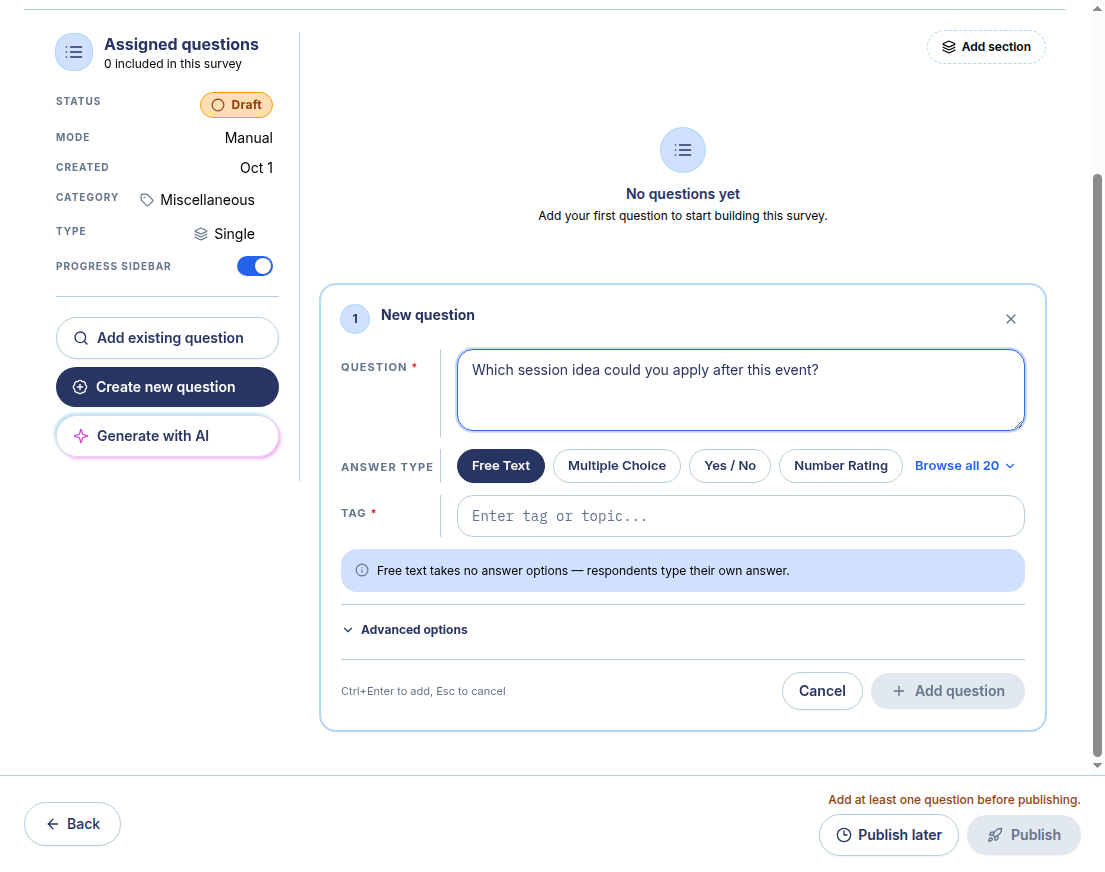
Choose questions about the customer touchpoint you are investigating, and avoid collecting credentials or private account details. The actual product screenshot shows a separate synthetic post-event demonstration; the example questions on this page are not already loaded in the product.
- Start a manual draft with this purpose: Check whether account prerequisites, the setup owner and the support route are clear before a new customer's first use.
- Copy or download the relevant example questions above, then create and add the questions in your draft. Review the question notes before deciding which prompts to keep.
- Check the respondent preview and apply this handling limit: Collect prerequisite categories and responsible roles, not passwords, identity documents or access tokens. Clear setup instructions do not establish that access is authorized or that a first useful task succeeded.
Screenshots demonstrate creation and preview. Distribution and results are separate steps; availability varies by account and plan.
Build with SurveyTeams
Draft your own new customer setup readiness questionnaire.
Use these examples to draft your questionnaire. Create a survey draft, add questions, and check the respondent preview in SurveyTeams. Additional features depend on your account and plan.
Create your survey in SurveyTeams
Opens product registration. Example questions are not imported automatically.
Learn about the product ↗Continue exploring