How clear were responsibilities during implementation?
Check whether each party understood its responsibilities; a completed project plan does not prove operational ownership.
Customer experience · Practical field guide
Find gaps between a delivered setup and readiness for everyday use.
Opens product registration. Example questions are not imported automatically.
Try the first three questions here. Nothing is submitted or saved.
A useful starting point
Find gaps between a delivered setup and readiness for everyday use. Choose the questions that fit the experience you are investigating; avoid asking people to evaluate a step they did not encounter.
If nothing was unclear or difficult, say so. Skip questions about steps you did not experience; use not applicable where appropriate.
Check whether each party understood its responsibilities; a completed project plan does not prove operational ownership.
Use a real everyday task to distinguish usable delivery from configuration being marked complete.
Identify support still needed without requiring disclosure of internal customer documents or system credentials.
Ask whether handover material helped an actual task, rather than whether documentation was supplied.
Assign unresolved work to a clear owner so implementation does not end with an untracked list of issues.
If nothing was unclear or difficult, say so. Skip questions about steps you did not experience; use not applicable where appropriate.

How clear were responsibilities during implementation?
Which everyday task is ready to use?
What still needs support?
Was the handover documentation useful?
Who owns outstanding implementation actions?
Download the questions as text ↓
Examples to adapt, rather than a validated research instrument.
Before you send it
Would you agree that customer implementation project was a completely positive experience?
How clear were responsibilities during implementation?
The initial wording assumes a positive evaluation. The revised question asks about the actual situation so a respondent can describe difficulty, uncertainty, or a different experience.
Choose the response format
| Question | Suggested format | What to preserve |
|---|---|---|
| How clear were responsibilities during implementation? | Short open text | Check whether each party understood its responsibilities; a completed project plan does not prove operational ownership. |
| Which everyday task is ready to use? | Short open text | Use a real everyday task to distinguish usable delivery from configuration being marked complete. |
| What still needs support? | Short open text | Identify support still needed without requiring disclosure of internal customer documents or system credentials. |
| Was the handover documentation useful? | Short open text | Ask whether handover material helped an actual task, rather than whether documentation was supplied. |
| Who owns outstanding implementation actions? | Short open text | Assign unresolved work to a clear owner so implementation does not end with an untracked list of issues. |
Make questions optional where appropriate. If you add a rating scale, label its endpoints, keep one idea per question, and retain a follow-up for reasons. These examples are not a validated measurement instrument.
From question to next step
Write down the decision you want this questionnaire to support: find gaps between a delivered setup and readiness for everyday use.
Invite people who experienced the relevant situation. Explain response handling and include an optional skip or not-applicable route. Technical setup and operational readiness are different outcomes.
Agree the handover checklist and assign outstanding actions.
A worked interpretation example
Illustrative scenario. These are not customer results.
Illustrative customers receive a finished setup but lack an owner for a remaining task.
Agree the handover checklist and assign outstanding actions.
After testing the action, revisit this original observation: Illustrative customers receive a finished setup but lack an owner for a remaining task. Repeat the relevant experience prompts with people who encountered the change. Compare specific explanations and sample differences; do not claim causation from the before-and-after responses.
Read the answers carefully
Technical setup and operational readiness are different outcomes.
Illustrative customers receive a finished setup but lack an owner for a remaining task. This is an illustrative interpretation problem rather than a real customer result. Agree the handover checklist and assign outstanding actions.
Before you send it
Find gaps between a delivered setup and readiness for everyday use. Start with one decision you can act on rather than using the survey to confirm a preferred answer.
Use a real everyday task to distinguish usable delivery from configuration being marked complete.
Agree the handover checklist and assign outstanding actions. This is an example action to investigate, not a guaranteed improvement.
Ask after respondents have experienced the specific situation in the first prompt: “How clear were responsibilities during implementation?” Allow enough time after a proposed change for people to experience it before repeating the questionnaire.
After testing the action, revisit this original observation: Illustrative customers receive a finished setup but lack an owner for a remaining task. Repeat the relevant experience prompts with people who encountered the change. Compare specific explanations and sample differences; do not claim causation from the before-and-after responses.
Copy the questions or download TXT, CSV, JSON, or a Markdown worksheet and adapt them in your own survey. The product CTA opens registration and does not import the example. Verify the features and terms available in your account.
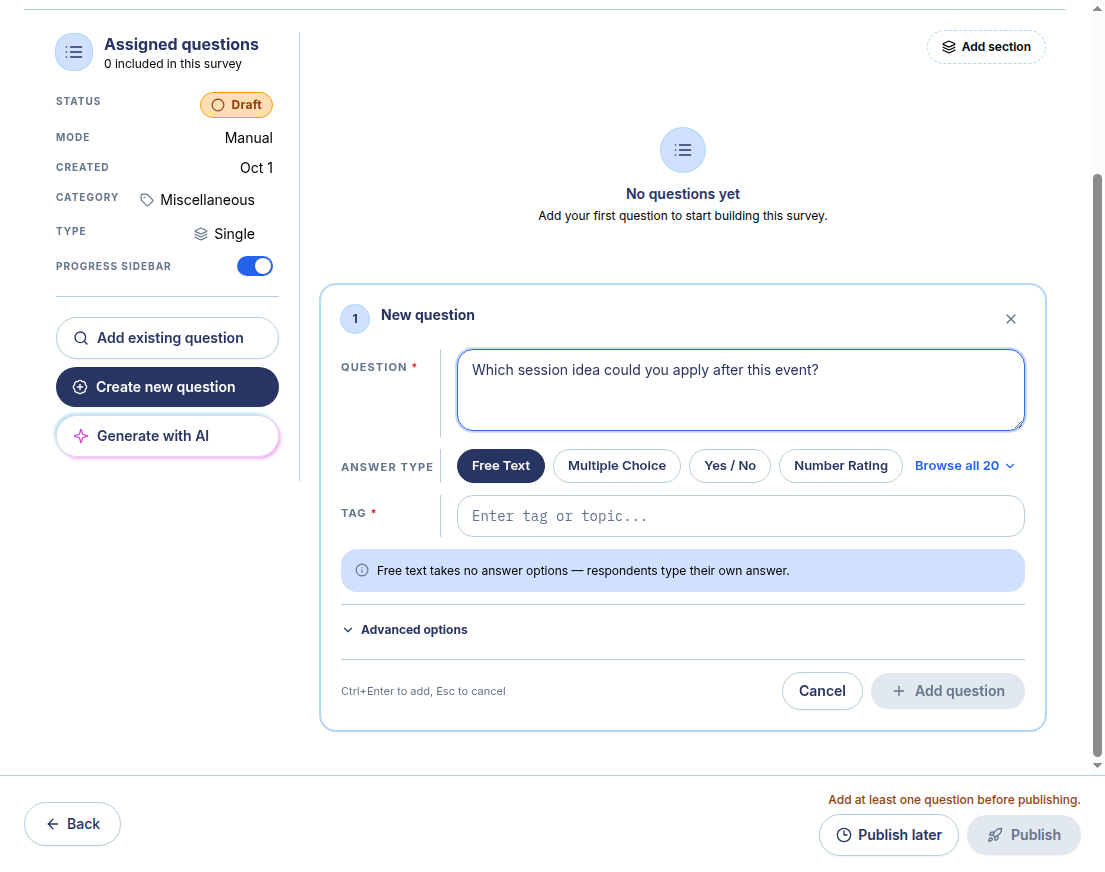
It shows a separate synthetic event-feedback example used to demonstrate the real builder. Copy or download the questions on this page and adapt them in your own draft. Registration does not import them automatically.
Inside the product
Choose questions about the customer touchpoint you are investigating, and avoid collecting credentials or private account details. The actual product screenshot shows a separate synthetic post-event demonstration; the example questions on this page are not already loaded in the product.
Screenshots demonstrate creation and preview. Distribution and results are separate steps; availability varies by account and plan.
Build with SurveyTeams
Use these examples to draft your questionnaire. Create a survey draft, add questions, and check the respondent preview in SurveyTeams. Additional features depend on your account and plan.
Opens product registration. Example questions are not imported automatically.
Learn about the product ↗Continue exploring